


How to Clean a Projector Screen & Lens (LCD Projectors)
Last updated: March 2026
Safe, simple steps for the projection screen and the outer projector lens — plus what NOT to clean (internal LCD/polarizer).
If you’re maintaining a new device or comparing models, you can also review the latest projector price in Bangladesh to choose a dust-resistant and high-brightness model suitable for your room.
What you can safely clean
- Projection screen surface: fixed-frame, pull-down, tripod, or portable. Use a soft method to avoid micro-scratches.
- Outer projector lens glass: dust and fingerprints on the outside only.
What NOT to clean (at home)
- Internal LCD panels / polarizers / prisms: opening the optical block risks permanent damage and voided warranty.
- Coated optics inside the projector: solvents can strip coatings or leave haze. Seek professional service.
Rule: clean the screen and the outer lens. Leave the inside to service centers.
Materials checklist
- Microfiber cloths (two or more, clean & lint-free)
- Bulb blower (or compressed air used sparingly, upright)
- Distilled water in a small spray bottle
- Mild dish soap (1–2 drops in 250 ml distilled water) for screens
- Lens cleaner labeled safe for multi-coated optics (for the outer lens only)
- Soft brush for edges/bezels
- Gloves (optional) to avoid fingerprints
Avoid harsh chemicals, paper towels, window cleaners, and high-strength alcohol on screens or coated optics.
How to clean a projection screen (step-by-step)
- Power down nearby devices and ensure the screen is cool and stable.
- Dry dust: use a clean microfiber or soft brush; wipe in straight, gentle passes.
- Spot clean: lightly mist a microfiber with the soap solution (don’t soak the screen). Dab—not rub—on smudges.
- Wipe & dry: follow with a second microfiber slightly dampened with distilled water; finish with a dry microfiber.
- Stubborn marks: repeat light passes. If the surface is specialty (ALR/ambient-light-rejecting), check the manufacturer’s care guide.
How to clean the projector outer lens
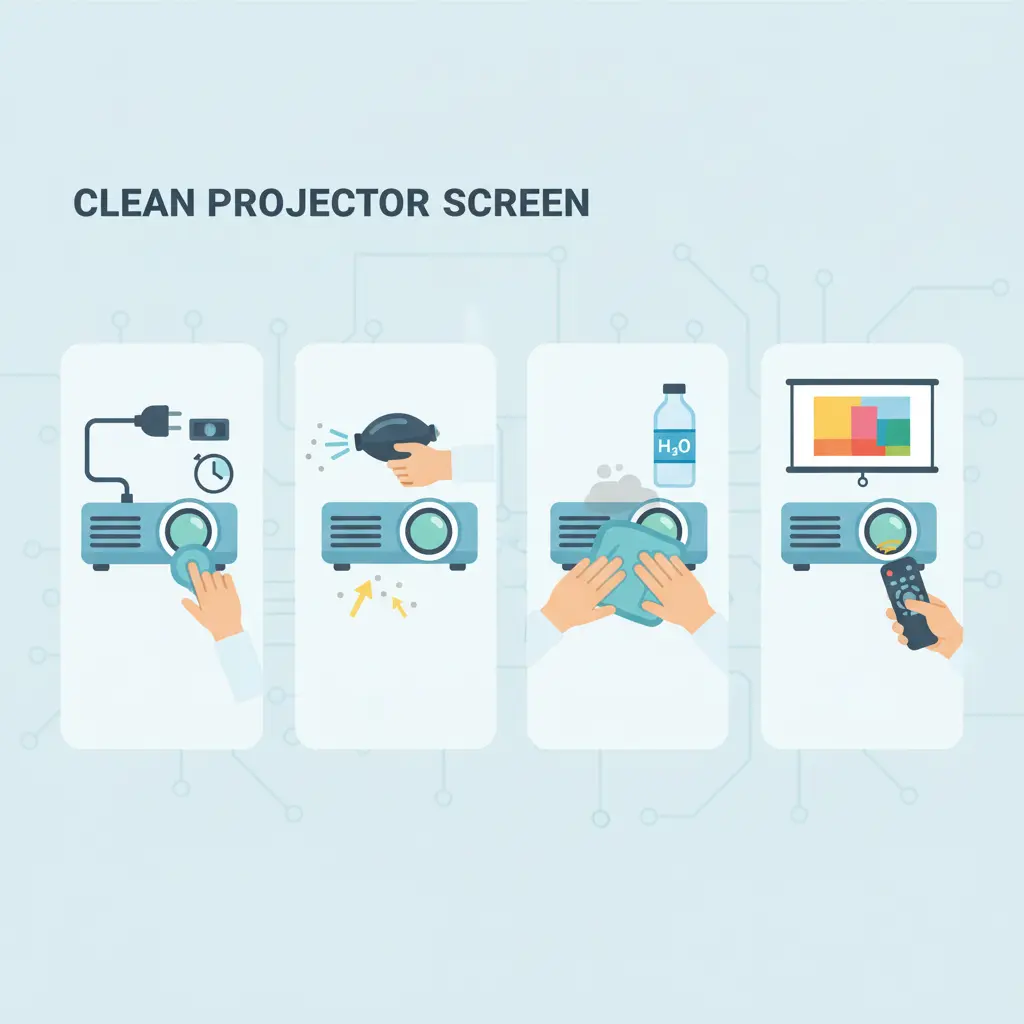
- Unplug & cool down the projector fully.
- Blow off dust with a bulb blower (or short bursts of upright compressed air).
- Lens cleaner: apply a drop to a microfiber; never drip directly on the lens. Wipe in small circles from center outward.
- Dry & inspect: use a fresh, dry microfiber; check under light for streaks.
Do not open the projector or touch internal LCD/polarizer assemblies at home.
Dust & maintenance tips
- Use a dust cover when not in use; keep the room clean and ventilated.
- Place the projector on a stable shelf; avoid fabric surfaces that shed lint.
- Replace/clean filters as per the manual; keep vents clear.
- If you see persistent spots/bands/colors after cleaning, seek service (could be internal dust or panel damage).
Modern models like the AUN U002 Pro with its fully sealed, dust-proof optical engine need no filter cleaning at all — dust can’t reach the picture-critical optics. Compare available models in our updated projector price list in Bangladesh.
Looking for a Low-Maintenance Projector?
Browse the complete projector price in Bangladesh and compare dust-proof, Full HD, and Android models suitable for home and office use.
FAQ
Can I use alcohol to clean the screen or lens?
Use a lens-safe cleaner for the outer lens only. For screens, prefer distilled water + mild soap. Strong solvents can damage coatings or leave haze.
There’s still a spot on the image after cleaning. What now?
If gentle cleaning doesn’t fix it, dust may be inside the optical block or the panel is damaged. Seek professional service; don’t open the projector at home.
How often should I clean?
Light dusting every few weeks; deeper screen/lens cleaning only when needed. Use a dust cover and maintain room cleanliness to reduce frequency.
Helpful Next Reading
- Tips for Using a Home Projector (Beginner Checklist)
- Projector Price in Bangladesh — compare models with official warranty.

I have read this instruction. It’s a great solution.